

Which DJ Controller Delivers Best Performance at Live Events?
Last Updated: October 26, 2026
Quick Summary
The best DJ controller for live events combines reliability, portability, and seamless integration with your venue's technical setup. Four-channel controllers like the Pioneer DJ DDJ-FLX10 and standalone systems like the Numark Mixstream Pro Go deliver professional performance, while mid-range controllers in the CAD $800-1500 range handle most live work effectively.
- Four-channel controllers offer club-style layout with stem performance capabilities to isolate and remix vocals, drums, bass, and melody live.
- Standalone systems eliminate laptop dependency by packing music storage, mixing engine, and audio outputs into one unit for maximum reliability.
- Microphone input with independent level control and talkover ducking is essential for announcements and crowd interaction at live events.
- Build a failure-recovery plan covering controller, laptop, storage, and power loss before the gig to keep music playing if primary gear fails.
- Mid-range professional controllers cost CAD $800-1500 and balance customization, portability, and professional capability for most live venues.
Table of Contents
- Why Live Event DJ Controllers Demand Different Specs Than Studio Gear
- Best Standalone DJ Systems for Laptop-Free Performance
- Four-Channel DJ Controller Setup for Club and Festival Use
- DJ Controllers for Club Use: Reliability and Integration
- DJ Controller with VirtualDJ: Software Compatibility and Performance
- Live Event Readiness: Backup Plans, Microphone Input, and Portability
- Choosing Your Live Event Controller: Budget, Venue Size, and Audience
- Frequently Asked Questions
Why Live Event DJ Controllers Demand Different Specs Than Studio Gear
A DJ controller built for studio production won't necessarily survive a DJ controller live events setup.
At a club, festival, or outdoor venue, your setup faces physical stress, temperature swings, power fluctuations, and time pressure. You need backup options, microphone input for announcements, and a controller that works standalone or with your laptop.
At RedOne Music Canada, we help DJs source controllers that perform under real-world conditions.
Best Standalone DJ Systems for Laptop-Free Performance
Standalone DJ systems let you perform without a laptop, eliminating a major point of failure at live events.
According to DJ Tech Reviews and Digital DJ Tips guides, standalone systems like the Numark Mixstream Pro Go, Pioneer DJ XDJ-RR, and Denon DJ SC Live 4 have become standard equipment for mobile DJs and festival performers. These units let you mix without depending on a laptop battery or software stability.
Standalone systems suit DJs who move between venues frequently or want maximum reliability. They cost more upfront and offer fewer customization options, but for live events, that simplicity and independence often outweigh the expense.
The best standalone DJ systems include onboard effects, hot cue buttons, jog wheels for beatmatching and scratching, and often built-in microphone inputs for announcements without extra gear.
Four-Channel DJ Controller Setup for Club and Festival Use
Four-channel control gives you independent mixing on two decks plus extra channels for effects or additional sources. This layout mirrors professional club setups and lets you layer tracks, trigger samples, or manage multiple sources during a performance.
According to DMT-FM product reviews, the Pioneer DJ DDJ-FLX10 exemplifies the four-channel standard, offering club-style layout, stem performance capabilities, and flexible routing.
When choosing a four-channel controller for live work, look for sturdy jog wheels, responsive performance pads, and a smooth, accurate crossfader, your primary mixing tool under pressure. Dedicated per-channel EQ lets you shape frequencies independently.
Cognitive Market Research's global market analysis notes that four-channel systems dominate the professional DJ equipment category, reflecting their widespread adoption at clubs and festivals. Consider a Reloop Modular Stand designed specifically for performance pad controllers to ensure stable, ergonomic setup at venues.
DJ Controllers for Club Use: Reliability and Integration
Most clubs run a permanent PA system, monitor speakers, and a house mixer. Your DJ controller must integrate seamlessly without creating feedback loops or audio dropouts.
Reliability in a club means solid USB connectivity, stable audio outputs, and a layout residents and guest DJs recognize instantly.
Many club DJs prefer XLR outputs over RCA because balanced XLR resists noise over long cable runs.
Integration also means working with the club's existing software or hardware ecosystem; some venues mandate specific DJ software or house mixers.
DJ Controller with VirtualDJ: Software Compatibility and Performance
VirtualDJ is one of the most widely installed DJ platforms in venues, and many clubs keep a licensed house computer so guest DJs can plug in without a full rig. A controller that integrates tightly with VirtualDJ gives you flexibility across venues, but "works with VirtualDJ" is not a binary. Integration depth varies enormously, and that variance separates a smooth live set from a night of troubleshooting.
Integration tiers you should actually check
Most controllers fall into one of three tiers with VirtualDJ:
- Native, deep integration. The controller is officially supported with a dedicated mapping, full display feedback, and access to advanced features such as stem separation, sampler control, and effects routing. These units behave like hardware designed for the software.
- Official basic mapping. The controller is listed as compatible, but some buttons and screens map to generic functions. You get reliable playback and mixing, but you lose the shortcuts that make a live workflow fast.
- Community or custom mapping. The controller works, but only because a user-built mapping exists. These can be excellent, but they are not guaranteed to survive software updates and are a risk at a live event.
Before you buy, check the official compatibility list on the VirtualDJ website and confirm which tier your candidate controller sits in. A controller that is only community-mapped is a poor choice for paid live work unless you have tested it thoroughly on your own laptop.
Add to Cart →
The live-event realities of software-based mixing
Software-based mixing depends on a stable laptop, reliable USB connectivity, and, for cloud or streaming features, network access, often the weakest link at a venue.
VirtualDJ's live-work strengths are real: advanced effects, video mixing, sampler and loop tools, and customizable button mapping. Large, responsive jog wheels still matter for accurate beatmatching and scratching, and the software handles track analysis and beat detection, so your controller mainly needs to translate physical movement into digital commands accurately.
Mapping and workflow tips for event performance
- Map for recovery, not just creativity. Assign a button or pad to reload the track, reset effects, and return to a known state. When something goes wrong mid-set, a one-press reset is worth more than an extra effect.
- Keep a tested backup mapping. Save your mapping to a USB drive and know how to load it on a venue machine. If the house computer has a different VirtualDJ version, your mapping may not carry over cleanly.
- Test on the venue's software version. VirtualDJ updates can change behavior. If you rely on a specific feature, confirm it works on the version installed at the venue before the event.
- Bring your own laptop and a backup audio path. Even with a house computer, a laptop with your library and a spare audio interface or cable set gives you a recovery route if the house system fails.
A controller that integrates deeply with VirtualDJ is a genuine asset across venues, but the software is only half the system; the other half is the laptop, library, mapping, and backup plan you bring.
Live Event Readiness: Backup Plans, Microphone Input, and Portability
A live event DJ needs redundancy, and redundancy is a workflow, not a checklist. Your controller might fail, your laptop might crash, your USB drive might corrupt. The best live event DJs carry backup gear and rehearse how they'll adapt when the primary setup fails, because the recovery path is what the crowd actually experiences.
Build a failure-recovery plan before the gig
A practical recovery plan covers four failure modes:
- Controller failure. Keep a second controller or a minimal backup path (a small standalone unit or a DJ app on a phone/tablet with a splitter cable) that can keep music playing while you swap gear. Know the cable changes required and practice them once at home.
- Laptop failure. Carry a second laptop or a bootable backup drive with your library and software already installed and authorized. Offline authorization matters: if the venue has no network, a software license that needs to phone home can lock you out.
- Storage failure. Keep two USB drives with your essential tracks, prepared identically. Rotate them so one is always a known-good copy.
- Power loss. Know how your controller behaves when power drops: does it resume, or does it need a full restart? A small uninterruptible power supply for your laptop and controller can bridge brief outages and prevent a hard crash.
Microphone and event-hosting workflow
Microphone input is essential for DJ controller live events: announcements, track intros, crowd hype, or handing the mic to a guest performer. Every controller worth using at a live event includes at least one microphone input with a dedicated level control.
Look for independent mic level and EQ, a talkover or ducking function that lowers the music when you speak, and a mic input that does not share a channel with your music.
Portability and deployment in real terms
Portability matters more than you might think. A heavy controller looks impressive until you're loading it into a van at midnight after a six-hour set.
Setup time is part of portability. Count the steps: unpack, place, connect power, connect audio, connect laptop, launch software, load library, test outputs.
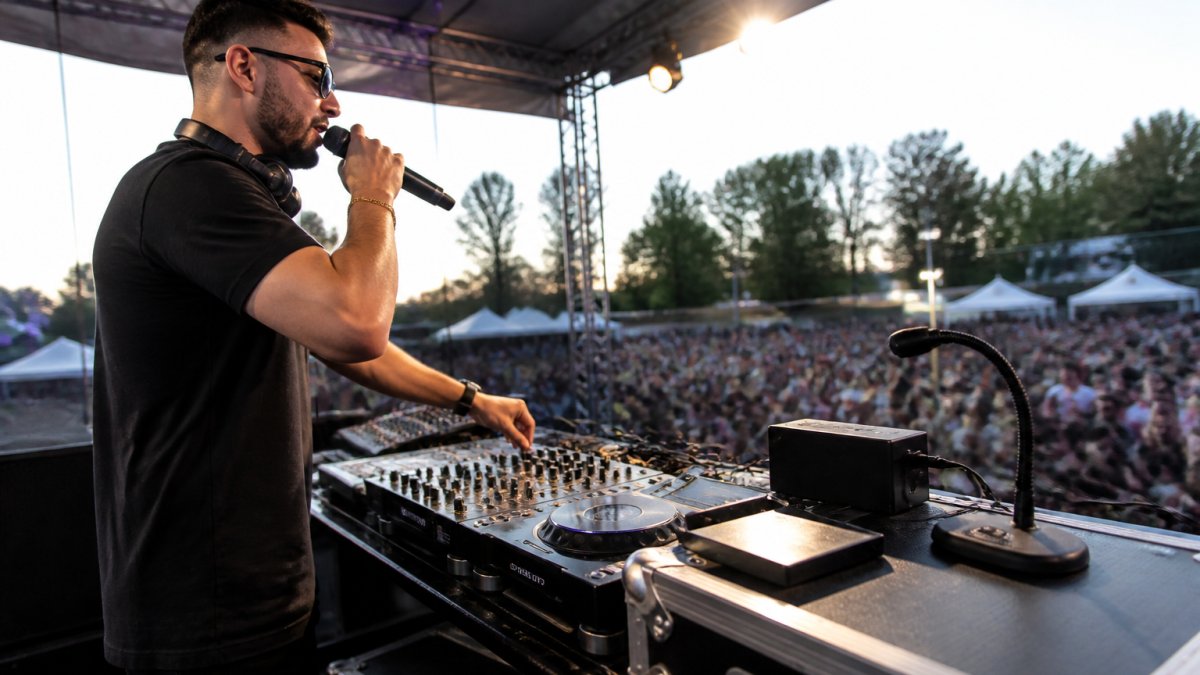
Consider investing in a On-Stage LPT7000 Deluxe Laptop Stand for live events where you're running software. For microphone work, a Standz STXLR-3 XLR Microphone Cable 3FT ensures reliable audio connection from your mic to the controller. You can also enhance your live event setup with professional lighting: the Microh DJ MINI-VENOM Red And Green Multi Beam Laser or Microh DJ Nitro Quad RGBW LED Effect add visual impact without requiring additional control surfaces.
The backup kit
Build a backup kit: spare USB cables, XLR adapters, headphone cables, a second USB drive with your essential tracks, a spare power adapter, and a small flashlight. Store these in your gig bag before you load your controller. When something fails at a live event, you will be glad you planned ahead, and the crowd will never know anything went wrong.
Choosing Your Live Event Controller: Budget, Venue Size, and Audience
Your choice of controller depends on the venues you play and the audiences you serve.
For club residencies and festival slots, invest in a controller that matches the venue's technical setup.
For outdoor events and festivals, prioritize weather resistance and portability.
Budget also affects your choice. Entry-level controllers start around CAD $300-400 and work fine for learning.
The controller you choose shapes your live performance experience. Standalone systems offer independence and simplicity.
| Controller Type | Budget Range | Best For |
|---|---|---|
| Entry-level | CAD $300-400 | Learning and practice |
| Mid-range professional | CAD $800-1500 | Most live work and small venues |
| High-end club and standalone | CAD $2500+ | Club residencies and festivals |
Frequently Asked Questions
What features should a DJ controller have for live events?
A live event DJ controller needs reliable build quality, multiple channels (ideally four for flexibility), responsive jog wheels for beatmatching, hot cues for quick track access, microphone input for announcements, and stable audio outputs to connect to venue PA systems. Portability matters: weight, compact design, and battery backup or USB power options reduce setup time and ensure you can respond quickly if the venue's power fluctuates. Headphone output with a cue button lets you preview tracks before mixing them in.
Are standalone DJ controllers better than laptop-based systems for live gigs?
Standalone DJ systems eliminate the laptop dependency, reducing failure points and setup complexity. They're ideal for outdoor events, mobile DJ work, and venues with unreliable power or WiFi. However, laptop-based controllers often offer more customization, software effects, and music library access. The best choice depends on your event type: standalone systems excel at reliability and portability, while laptop controllers give you deeper creative control if your power and connectivity are stable.
Can I use a four-channel DJ controller for both club residencies and mobile events?
Yes. A four-channel DJ controller provides the flexibility to handle both scenarios. In a club, you can run two decks on channels 1-2 and use channels 3-4 for effects, sampling, or a second mixer setup. For mobile events, you can simplify to two active channels and use the extra channels for backup or microphone input. The four-channel layout gives you growth room and adapts to different venue sizes and event types without requiring a gear swap.
What backup plan should I have if my DJ controller fails during a live event?
Bring a second controller or a USB turntable as a backup, and test it before the event. Carry spare USB cables, power adapters, and a backup music drive loaded with your entire library. Know the venue's PA system layout so you can switch gear quickly if needed. Keep your hot cues and track settings documented or synced to the cloud. Many experienced mobile DJs also carry a basic mixer and backup headphones. The goal is to minimize downtime and keep the music playing while you troubleshoot.

Aucun commentaire pour l'instant
Soyez le premier à partager vos impressions sur cet article.
Laisser un commentaire
Prêt à trouver votre son?
Explorez notre vaste sélection d'instruments, d'équipements et d'accessoires. Que vous soyez débutant ou professionnel, nous avons ce qu'il vous faut.